The Starting Point
This is how I lead design systems work now. Not AI-assisted in the vague sense. A specific three-tier methodology where every phase has a defined role for human judgment, AI acceleration, and automated pipelines. I direct the work. The tools execute more of it.
The methodology is grounded in something real. The Intel.com Documentation Framework I built without AI produced a 75% reduction in development questions, 98% team adoption, and a 5% rework rate across 80+ documented page patterns. That foundation taught me precisely where human judgment is irreplaceable, and where it was being spent on work that shouldn’t require it.
What this page documents is the distinction between two genuinely different capabilities. Acceleration means faster drafts, broader coverage, better options evaluated before committing. Automation means the output runs as a pipeline: triggered, executed, and delivered without manual effort in between. Knowing which is which, and when each applies, is the methodology.
A note on the two-layer system this methodology addresses. The design system was built in two connected layers, both requiring documentation.
Atomic components are the building blocks: buttons, cards, media elements, headings, and heading groups, each with their own variations. These are the reusable elements developers reference and implement directly.
Page patterns are the 80+ full-section designs assembled from those atomic components: layouts like Hero sections, FAQ accordions, Call-to-Action bars, Product Tables, and Marketing Card grids. These are the building blocks used to assemble complete pages inside AEM.
The documentation challenge wasn’t just volume across both layers. It was the dependency chain between them: a change to an atomic component ripples into every page pattern that uses it. Keeping both layers manually aligned was where the framework strained most under scale.
Design tokens (type, color, and spacing) defined at the atomic level are the connective tissue between both layers, ensuring design decisions flow consistently into every pattern built from them.
A Three-Tier System
Not all AI involvement is equal. This methodology operates across three distinct tiers, and the distinction matters both for how work gets done and for how it gets communicated to collaborators.
Human-Led
Stakeholder relationships, judgment calls, final decisions, design intent, and anything requiring empathy or platform-specific knowledge that AI doesn’t have.
AI-Accelerated
Synthesis, first drafts, alternatives exploration, scenario stress-testing, and coverage expansion. Faster output with human review at every step.
Automated Pipeline
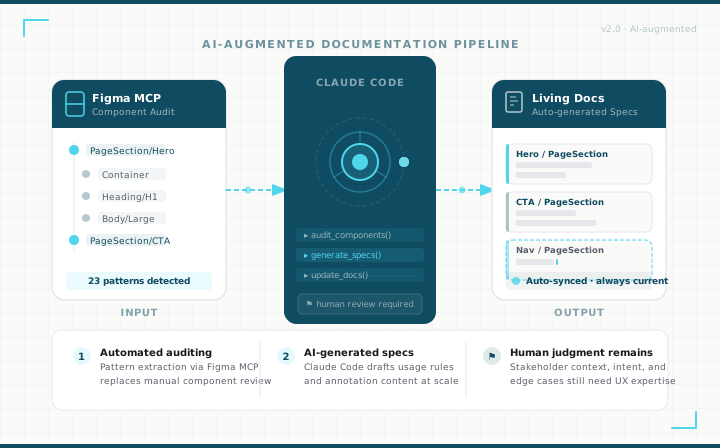
Claude Code + Figma Console MCP run as a connected system: reading live Figma data across both layers, auditing components and patterns, tracing dependencies, generating structured outputs, and flagging drift without manual triggering.
The principle that doesn’t change: Automation handles the mechanical work that slows expert thinking down. It doesn’t replace the designer’s judgment, the developer’s technical context, or the relationship work that drives adoption. Those remain entirely human.
The Automation Pipeline
Claude Code and Figma Console MCP work as a connected system across both documentation layers. Figma MCP reads the live file: atomic component structures and their variations, page pattern layouts, content zone configurations, and the compositional relationships between them. Claude Code acts on that data: auditing both layers, mapping which atomic components appear in which patterns, generating structured spec drafts, and flagging cross-layer drift when a component change affects patterns downstream.
End-to-End Documentation Pipeline
Claude Code + Figma Console MCP, across both layers
Read Both Layers
Figma MCP extracts atomic components with variations, page pattern structures, and compositional relationships between them
Audit & Map Dependencies
Claude Code audits both layers and maps which atomic components appear in which patterns, the dependency chain that manual docs couldn’t track
Generate Both Spec Types
Atomic component specs with variation tables and page pattern specs seeded from real Figma data, not written from scratch
Monitor Cross-Layer Drift
When an atomic component changes, every pattern that uses it is flagged automatically, a governance capability that was impossible to maintain manually at scale
The Methodology Across Every Phase
Every phase of a design systems project has a defined role for each tier. The table below maps where human judgment leads, where AI accelerates, and where automation takes over, across the full arc from research through governance. The three phases that follow go deeper, because they’re where all three tiers converge and where the methodology has the most to show.
| Phase | I Own | AI Handles |
|---|---|---|
| Research & Discovery | Stakeholder interviews, workflow observation, root cause judgment | Synthesis, affinity clustering, gap analysis matrix, findings summary |
| Personas & User Modeling | Validation, tension identification, trade-off decisions | Draft profiles, usage scenarios, edge case stress-testing |
| Ideation & Exploration | Final format decision, adoption likelihood, editorial standard | Format options with trade-offs, comparison matrix, stakeholder rationale |
| Testing & Validation | Pre-dev reviews, ambiguous feedback interpretation, iteration priority | Feedback synthesis, contradiction clustering, iteration recommendations |
| Framework Design | IA decisions, AEM/Bootstrap constraints, toolchain fit | Structure drafts, variation checklists, template skeletons, plus automated inventory and dependency mapping |
| Spec Writing & Handoff | Variation rationale, narrative, platform accuracy review | Variation tables, usage rules, QA criteria, plus automated spec generation from live Figma data |
| Living Docs & Governance | Change significance, stakeholder communication, versioning decisions | Update summaries, release notes, onboarding summaries, plus automated drift detection and governance reports |
The last three phases are documented in full below. Framework Design, Spec Writing, and Governance are where all three tiers interact most visibly, and where the gap between manual process and automated pipeline is widest. Each one shows exactly what changes when the methodology is applied.
Framework Design & System Auditing
Tiers 1, 2 & 3: Human-led, AI-accelerated, and Automation-Ready
I would still own
- Design the IA to serve both layers and the relationship between them
- Decide where atomic component docs should stand alone vs. be embedded in pattern docs
- Navigate AEM and Bootstrap constraints that AI doesn’t have knowledge of
- Ensure the structure works within the existing toolchain
AI accelerates
- Draft the initial IA structure covering both documentation layers
- Generate variation checklists for each atomic component type
- Identify structural gaps across both spec types
- Produce template skeletons for both spec types, ready for real content
Figma Console MCP reads the live file and extracts both layers simultaneously: the full atomic component library (buttons, cards, media, headings, heading groups) with all their variations, and the full page pattern inventory (Heroes, FAQs, CTAs, Product Tables, Marketing Cards) with their content zone configurations.
Claude Code builds a dependency map: which atomic components appear in which page patterns, how many patterns use each component, and which component variations are referenced where. This cross-layer map is what makes downstream governance possible, and what was impossible to maintain manually.
Coverage audits run against both layers: which atomic components are missing variation documentation, which page patterns lack content zone specs, which shared tokens are implemented inconsistently across either layer. One gaps report covers the entire system.
Spec Writing & Handoff
Tiers 1, 2 & 3: The Most Significant Automation Opportunity in the Project
I would still own
- Define which variations matter and why, as variation tables are only useful if the variations are correctly identified
- Write the “why this exists” narrative for both atomic components and page patterns
- Review every spec for AEM authoring accuracy and Bootstrap constraint correctness
- Validate that specs reflect what’s actually buildable within the platform
- Determine what Dev Mode communicates adequately versus what requires written specification, and author the parts no automated tool can provide: intent, valid combinations, platform constraints, and design reasoning
- Establish which accessibility requirements can be validated at the design stage and which must be explicitly flagged for development-phase validation, and document both, so compliance isn’t left to assumption once a component is built
- Own component code mapping, translating Figma variants and design tokens to their code counterparts and ensuring the relationship between design and implementation is explicit
AI accelerates
- Draft Do/Don’t usage rules for both atomic components and page patterns
- Generate comprehensive variation tables for components like buttons and cards
- Produce QA acceptance criteria from functional requirements at both levels
- Identify edge cases specific to each component or pattern type
- Generate accessibility acceptance criteria as part of QA checklists for both spec types, distinguishing design-stage checks (contrast, touch targets, focus indicators) from requirements that must be validated in code
- Draft initial component code mapping documentation from extracted variant and token data, ready for accuracy review against the actual codebase
For atomic components, Figma MCP reads the component’s node tree, all variant properties and combinations, interactive states, and the full design token set (type, color, and spacing) that connects atomic decisions to every pattern built from them. A button yields its full variation matrix (size, style, state, icon options) along with its token references, without anyone re-describing it manually.
For page patterns, Figma MCP reads the section layout, which atomic components it contains and in which configurations, H2 and description field variants, content zone structure, and responsive breakpoint states, including which component variations are used where within the pattern.
Claude Code generates both spec types from the extracted data: atomic component specs with full variation tables, state definitions, and token references; page pattern specs with content zone rules, composition notes, AEM authoring constraints, and a first-pass QA checklist. Both layers. Same effort as one.
Living Documentation & Governance
Tiers 1, 2 & 3: Human Judgment and AI-Powered Detection, Working in Tandem
I would still own
- Decide what constitutes a meaningful change vs. minor clarification
- Own the governance process and drive team accountability
- Communicate changes to stakeholders in a way that builds confidence
- Make deprecation and versioning decisions that require platform context
- Maintain change transparency in a way that builds stakeholder confidence, deciding what constitutes a meaningful change worth communicating versus a minor correction, and how that gets framed for designers, developers, and content authors respectively
AI accelerates
- Draft update summaries structured for different audiences (designers vs. developers vs. QA)
- Generate deprecation and version notes in a consistent format
- Produce onboarding summaries for new team members from existing documentation
- Synthesize change logs into plain-language release notes
Figma MCP monitors both layers. When anything changes (an atomic component variant is updated, a token is modified, a page pattern’s content zone is reconfigured), the delta is captured against the stored snapshot. Changes at either level trigger the next step.
This is where the dependency map built during Framework Design pays off. Claude Code traces the change through the system: if a button variant changes, every page pattern that uses that button is immediately identified. Drift is flagged across both spec types before any developer encounters it.
A governance report is generated on a defined cadence: atomic component health, page pattern documentation coverage, outstanding cross-layer drift, and a changelog summary. Design system governance moves from reactive to proactive, with a full audit trail to share at every sprint review.
Core Principles: What Doesn’t Change
Mapping AI and automation onto a completed project reveals something important: the parts being automated were always bottlenecks: manual auditing, blank-page spec writing, reactive drift detection. The parts that made this project successful are untouched.
Relationships drive adoption. Automation can’t build them.
The 98% adoption rate didn’t come from well-written documentation. It came from stakeholder interviews that built trust, pilot programs that demonstrated value before asking for behavior change, and a framework designed around real workflows rather than ideal ones. The pipeline produces better specs faster. It cannot do the relationship work that makes people actually use them.
Domain expertise is what makes automated output useful.
A spec seeded from Figma data is only as good as the constraints and context added on top of it. The AEM authoring model, Bootstrap integration requirements, and the rules governing how atomic components could and couldn’t be combined within page patterns were the hardest things to specify correctly. That knowledge comes from deep platform expertise. Claude Code extracts what exists in Figma. It doesn’t know what should exist, what combinations are valid, or why certain patterns were built the way they were.
Every automated output requires human review. No exceptions.
A wrong acceptance criterion in a page pattern spec causes a developer to build the wrong thing, and nobody catches it until QA. Automated spec drafts look correct. That’s precisely why reviewing them is non-negotiable. The efficiency gain is real, but it comes from faster generation, not from skipping review. The pipeline compresses the work. It doesn’t remove the responsibility.
Documentation is a UX problem.
The specs that drove adoption weren’t just technically accurate; they were designed for the people who had to use them. One document structured to serve designers, developers, QA, and content authors without separate versions or different navigation paths. The same information architecture discipline applied to any user-facing product, turned inward. Automated pipelines can generate accurate content. Designing that content to be found, understood, and trusted by every audience it serves is a different skill entirely.